Picture this: You’ve just spent hours perfecting your latest video—the editing is flawless, the content is engaging, and you’re confident it’s your best work yet. You hit publish, wait for the views to roll in, and… nothing. Sound familiar?
Here’s the truth that many creators learn the hard way: creating great content is only half the battle. The other half? Making sure people actually find it.
YouTube success demands more than just creativity. It requires strategy, optimization, and smart use of data. But here’s the challenge: most creators are already stretched thin managing content production, community engagement, and consistent uploads. Who has time to become an SEO expert, data analyst, and marketing strategist on top of everything else?
This is exactly why VidGent exists! As an AI-powered toolkit built specifically for YouTubers, VidGent handles the technical heavy lifting so you can focus on what you do best: creating videos your audience will love.
From SEO optimization to competitor analysis, VidGent transforms complex YouTube growth strategies into simple, actionable tools.
In this guide, we’re breaking down the five essential VidGent features that can transform your channel’s performance. Whether you’re just starting out or looking to scale an established audience. Let’s dive in.
Ready to grow your Youtube Channel?
Its free to get started.
Feature #1 – Optimize Existing Videos
Every creator has a backlog of videos that could be performing better. With VidGent’s video optimization tool, you can refresh old content by refining titles, tags, descriptions, and even thumbnails.
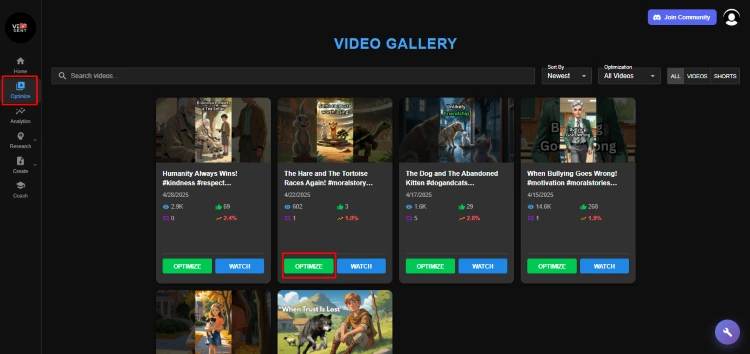
This feature is a game-changer for SEO, ensuring that older uploads stay relevant in YouTube’s search and recommendation system. For example, a video uploaded two years ago can still attract new viewers if optimized with the right keywords and metadata.
What makes VidGent especially powerful is that it doesn’t just let you edit these elements, it helps you optimize titles, descriptions, and thumbnails with SEO ranking in mind.
Since SEO directly impacts how your videos appear in YouTube search and suggested feeds, small improvements in wording or design can significantly boost visibility and engagement.
Optimized Title
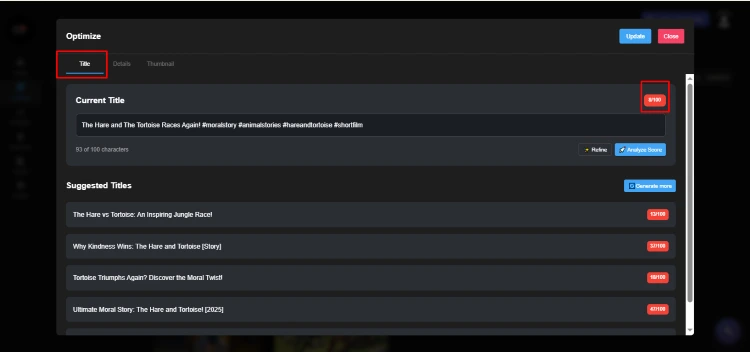
VidGent suggests keyword-rich, audience-friendly titles that balance creativity with SEO value, ensuring your video stands out in search results.
Optimized Description
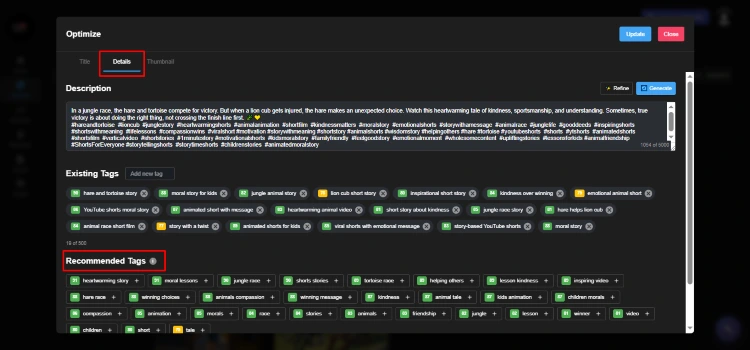
With AI-guided recommendations, your video descriptions are structured for both viewers and algorithms, driving clicks while boosting discoverability.
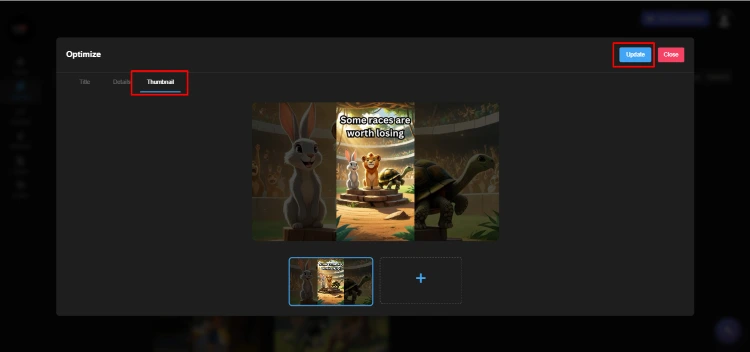
Optimized Thumbnail
VidGent’s thumbnail optimizer let creators refresh outdated thumbnails and generate eye-catching new designs, ensuring videos stay relevant and continue to attract clicks with a polished, professional look.
Pro tip: Use this feature for older videos that still bring in views but aren’t ranking as high as they could. With SEO-backed optimization, you can breathe new life into your existing library and turn forgotten uploads into consistent traffic drivers.
Feature #2 – Analytics Dashboard
Numbers tell the story of your channel’s growth, and VidGent’s analytics dashboard makes it effortless to track them. You’ll get a clear overview of views, subscribers, watch time, and even revenue in one place.
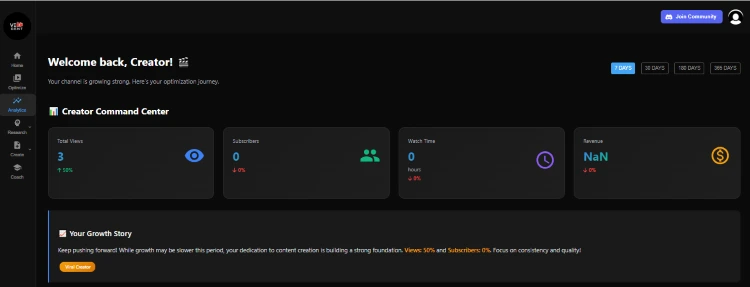
Not only this, but the dashboard also displays graphs of views over time, subscriber growth, audience demographics, and traffic sources, making it easier to track performance visually.
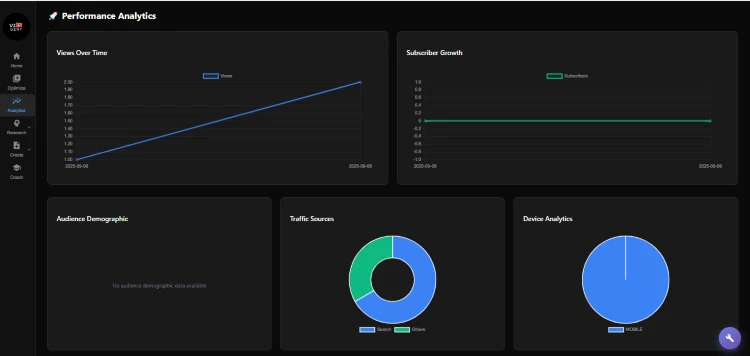
What makes it powerful is its simplicity. Instead of sifting through complex reports, VidGent presents insights in a way that’s easy to understand at a glance. This helps creators quickly identify what’s working and what needs improvement.
With real-time data at your fingertips, you can make smarter decisions and optimize your channel with confidence.
By using these insights, you can adjust your content strategy, double down on what your audience loves, and spot potential growth opportunities.
Feature #3 – Keyword & Trend Explorer
Success on YouTube often comes down to being at the right place at the right time, and VidGent’s Keyword & Trend Explorer ensures you never miss that chance.
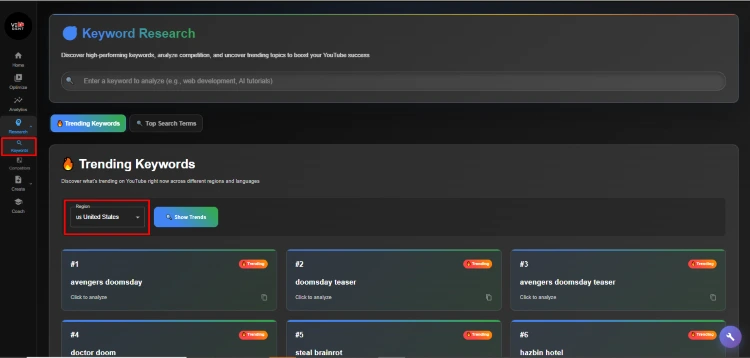
How it works: The tool helps creators discover trending keywords and even filter them by region. This means you can align your video topics with what people are actively searching for, giving your content a better shot at ranking high in search results.
Strategic application: Before planning your next video, spend a few minutes exploring trending keywords in your niche. Think of it as having a roadmap to visibility—instead of guessing what topics might perform well, you’re working with data that shows you exactly where the opportunities are.
Pro tip: Look for keywords with rising search interest but relatively low competition. These “opportunity keywords” represent topics where you can establish authority before they become oversaturated, positioning your content to capture traffic as interest grows.
Before planning your next upload, spend a few minutes in the Trend Explorer, it’s like having a cheat sheet for visibility.
Feature #4 – Competitor Tracking
In YouTube’s competitive landscape, understanding what works in your niche isn’t optional—it’s essential. But manually tracking competitor channels, analyzing their strategies, and identifying patterns is time-consuming and often imprecise.
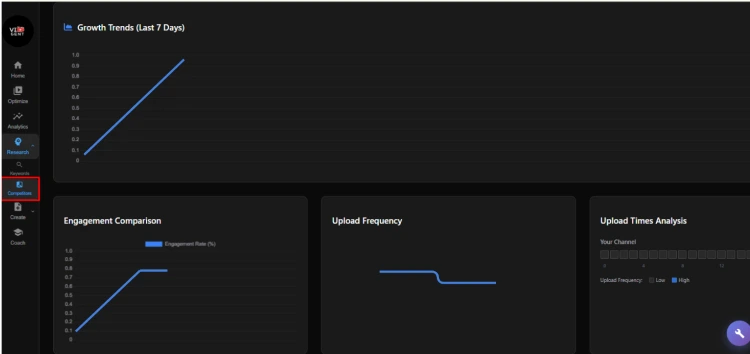
VidGent’s Competitor Tracking feature changes the game by letting you add rival channels and compare key performance metrics side by side in one organized dashboard.
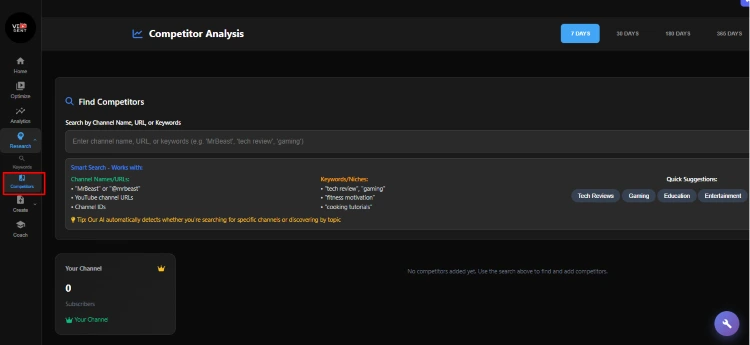
Important clarification: This isn’t about copying what others are doing. It’s about learning from the broader landscape of your niche to refine and improve your own unique approach.
What you can track:
- Upload frequency and consistency patterns
- Video performance metrics (views, engagement, growth rate)
- Content topics and formats that resonate with shared audiences
- Thumbnail and title strategies that drive clicks
- Audience engagement levels across different content types
Real-world example:vIf you notice a competitor’s tutorial-style videos consistently outperform their vlogs, that’s valuable data. It might indicate that your shared audience prefers educational content over personal updates—insight you can use to adjust your content mix accordingly.
Feature #5 – AI Thumbnail & Script Generator
Sometimes the hardest part of content creation is getting started. VidGent eliminates this hurdle with its AI-powered thumbnail and script generator.
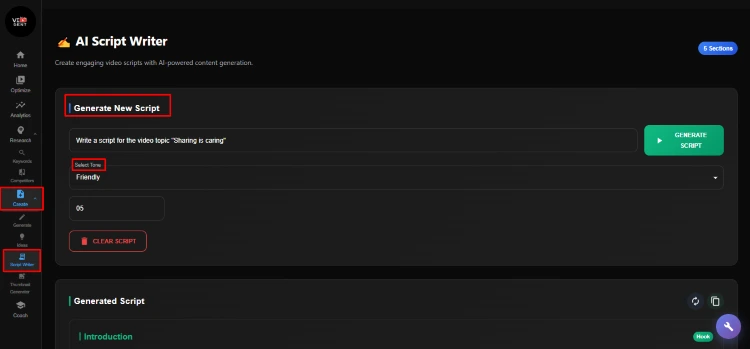
Customizable parameters:
- Tone selection: Choose from professional, casual, friendly, educational, or other styles that match your brand
- Length control: Set your desired video duration, and VidGent structures the script accordingly
- Topic input: Simply describe your video concept, and the AI builds a complete, audience-ready script
The result? A professionally structured script that you can use as-is or customize with your personal experiences and insights. No more staring at blank documents or struggling to organize your thoughts—VidGent provides the framework, and you add the personality.
AI Thumbnail Generator: Professional Designs in Seconds
Thumbnails can make or break your video’s performance, but not every creator is a graphic designer. VidGent’s thumbnail generator solves this challenge by creating visually engaging designs tailored to your video’s theme and your channel’s brand.
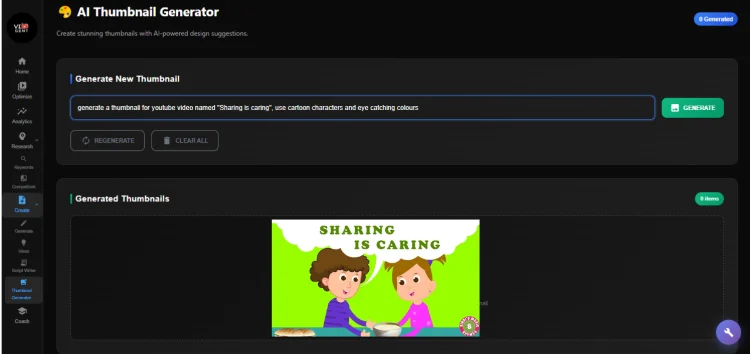
How it works:
- Define your preferred thumbnail style (bold and colorful, minimalist and clean, dramatic and eye-catching, etc.)
- Input your video topic or key message
- Receive multiple professional thumbnail options in under a minute
Time-saving impact: What used to take 30-60 minutes per video now takes less than 5 minutes, freeing up hours each week that you can reinvest in content creation, community engagement, or simply avoiding creator burnout.
Putting VidGent to Work: Your Action Plan
Now that you understand VidGent’s core features, here’s how to integrate them into your workflow for maximum impact:
Week 1: Foundation
- Set up your analytics dashboard and establish baseline metrics
- Add 2-3 competitor channels to begin tracking
- Optimize your 3 most-viewed videos from the past year
Week 2: Content Planning
- Use the Keyword & Trend Explorer to identify 5-10 video topics
- Generate scripts for your next 2-3 videos
- Create thumbnail concepts for upcoming content
Week 3: Optimization & Analysis
- Review analytics to identify performance patterns
- Optimize 5 more existing videos based on keyword research
- Analyze competitor insights to refine your content strategy
Ongoing: Make VidGent part of your regular workflow. Check analytics weekly, research keywords before each video, and continuously optimize your content library.
Final Thoughts
VidGent isn’t just another tool, it’s a complete growth partner designed to support YouTubers at every stage of their journey.
From optimizing your existing content to providing powerful analytics, uncovering trending keywords, monitoring competitors, and generating engaging scripts and thumbnails, VidGent equips creators with everything they need to succeed.
To recap, here are the 5 essential features every YouTuber should master:
- Optimize Existing Videos – Breathe new life into your content library
- Analytics Dashboard – Make data-driven decisions with confidence
- Keyword & Trend Explorer – Create content people are actively searching for
- Competitor Tracking – Learn from your niche and stay ahead of trends
- AI Thumbnail & Script Generator – Accelerate production without sacrificing quality
If you’re serious about growing your YouTube channel, VidGent’s all-in-one toolkit makes the process smarter, faster, and more effective. Start using these features today and take your content strategy, and your channel, to the next level.