If you’ve ever felt like your YouTube channel name no longer reflects your content, you’re not alone. Whether your brand has evolved, you’re rebranding, or you simply want something fresh, changing your YouTube channel name is a straightforward process.
In this guide, I’ll show you exactly how to do it, plus tips to avoid common mistakes and keep your channel growth on track.
Why Change Your YouTube Channel Name?
There are plenty of reasons you might want to update your YouTube name. It could be that your content has shifted, or maybe your channel’s focus has changed.
For instance, you started as a gaming channel but now focus on tech reviews. Your old name may no longer resonate with your new audience.
A name change can also help:
- Better represent your brand: A name that reflects your content clearly will help new viewers understand what you’re about.
- Improve discoverability: A catchy, clear name makes it easier for people to find you.
- Signal growth: Changing your name might indicate a shift in the direction of your channel, helping you attract the right audience.
How to Change Your YouTube Channel Name: Step-by-Step Guide
Changing your YouTube channel name is easy and can be done on both desktop and mobile. Here’s how:
On Desktop:
- Sign in to YouTube: Open YouTube and sign in to the account that owns the channel.
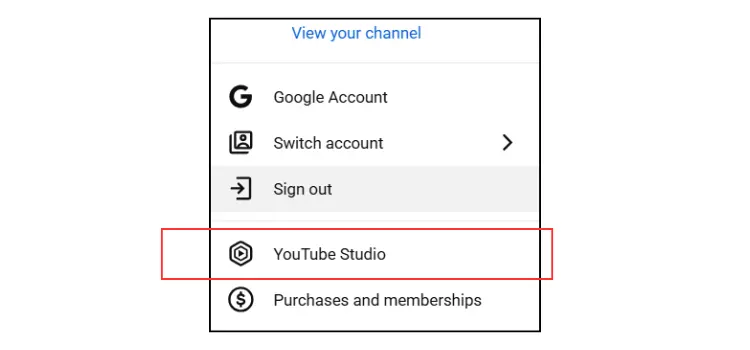
- Go to YouTube Studio: Click on your profile picture in the top right corner, then select YouTube Studio.
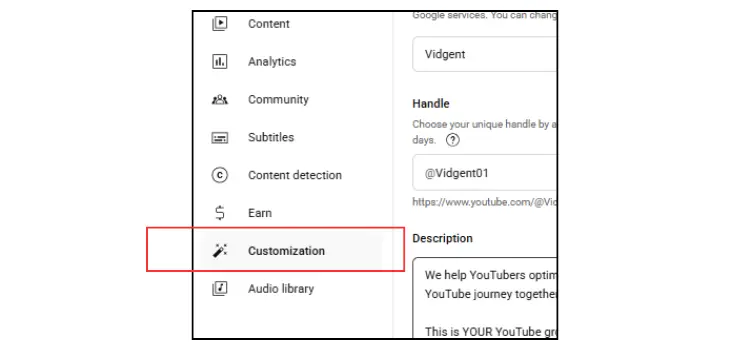
- Access Your Settings: In the left-hand menu, click on Customization.
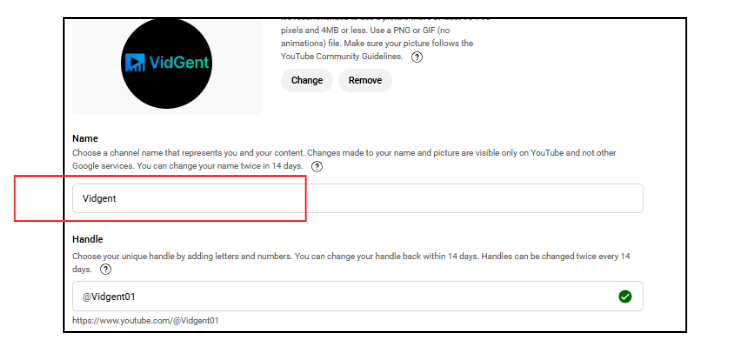
- Change Your Name: Under the Basic Info tab, click the pencil icon next to your current channel name. Enter your new name and click Publish.
On Mobile (YouTube App):
- Open the YouTube app and sign in to your account.
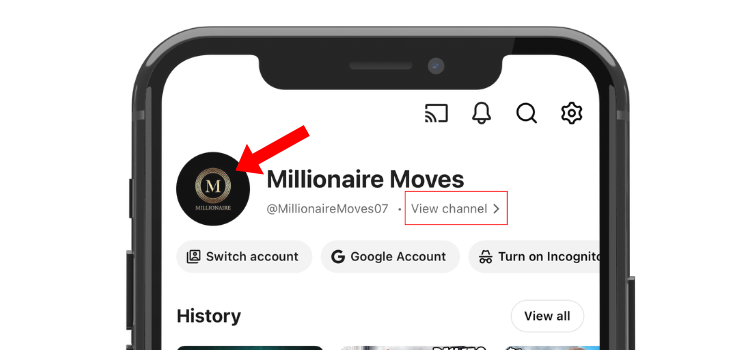
- Tap on your profile picture, then tap on Your Channel.
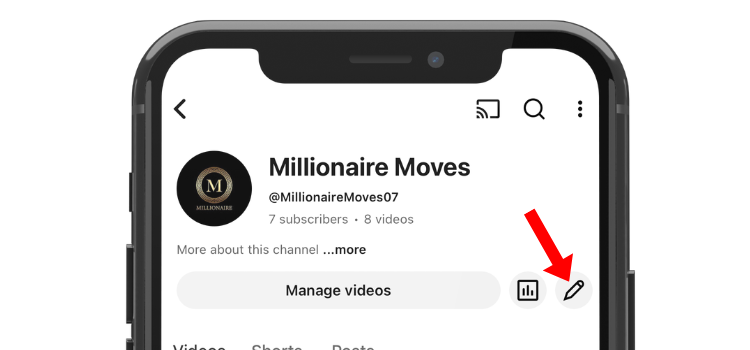
- Tap on the Edit Channel button (pencil icon).
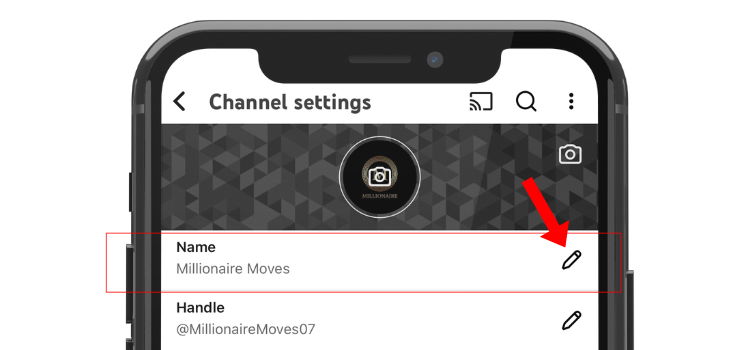
- Enter your new channel name and save the changes.
What to Consider Before Changing Your Name
Before you go ahead with changing your name, take a moment to make sure it’s the right move. Here are some things to check before you hit that “Change Name” button:
- Consistency across platforms: Make sure your new name is available on other platforms, such as Instagram, Twitter, and even as a domain name. This helps with brand consistency.
- Audience expectations: Consider how your current audience will react to the change. If your channel has a dedicated fanbase, make sure they’ll still connect with the new name.
- SEO and discoverability: Think about keywords related to your channel’s content. Does your new name make it easier for people to find you?
- Branding elements: Check your logo, channel art, and any video intros. Will these still fit with the new name?
What Happens After You Change Your Name?
Once you change your YouTube name, there are a few things to keep in mind:
- Channel URL: Changing your name doesn’t affect your custom URL. If you want to update that too, you’ll need to request a custom URL change.
- Your Brand’s Identity: The change will reflect on your YouTube channel immediately, but it may take a little while for the new name to show up across the platform.
- Your Audience’s Reaction: If your channel has a loyal audience, some might be confused by the name change. Consider letting them know beforehand through a video update or social media announcement.
Pro Tips for a Successful Name Change
Before you commit to a new name, here are some pro tips to ensure you’re on the right track:
- Keep it simple: Avoid long or complicated names. The simpler and catchier, the better.
- Think long-term: Your content may evolve again. Choose a name that can grow with your channel.
- Avoid trendy names: While catchy names might be tempting, trends change quickly. Pick something timeless that suits your channel’s mission.
- Test your name: Ask friends or followers for feedback before finalizing the change. You might get helpful insights that you hadn’t considered.
Conclusion
Changing your YouTube channel name doesn’t have to be a daunting process. By following the steps outlined above and considering the tips provided, you can ensure that your new name aligns with your brand and helps you attract more viewers.
Remember, the key is to make sure your name represents you and your content clearly.
Take some time to think through your options, and once you’re ready, make the change with confidence!
